
PARTNER DATA & MARKETING INFO
3D Digital Art: Design and Modeling with Tinker CAD: After-School Program
DA-DM-02
DA-DM-02 | DA-DM-A2
This hands-on, student-centered 3D digital art course using TinkerCAD software teaches kids in grades 4-10 to design and create their own unique 3D objects, buildings, and characters.
Get ready to unleash your inner 3D artist! In this exciting and fun-filled course, you’ll learn how to create your own unique 3D objects, buildings, and characters using TinkerCAD software. All skill levels welcome!
Looking for an exciting and educational summer camp experience for your child? Look no further than Fleming Tech Camps’ 3D Digital Art: Design and Modeling with TinkerCAD program! Participants will learn the key principles of 3D digital art, including how to construct detailed 3D images and use sophisticated software tools like TinkerCAD. They will also gain valuable skills in areas such as scope, scale, and functionality in design, while working collaboratively on a huge meta-project. This program is the perfect way to introduce your child to the fascinating world of digital art, while providing them with the skills and knowledge they need to succeed in this exciting field. Sign up today and give your child the gift of creativity and innovation!
- 3D digital art
- TinkerCAD
- Summer camp
- Educational program
- Digital art design
- 3D modeling
- Software tools
- Scope and scale in design
- Functionality in design
- Collaboration
- Team-building
- Meta-project
- Creativity
- Innovation
- Professional-quality digital art
- Principles of 3D art
[Opening shot of a child using a computer to create a 3D digital art project]
Narrator: Want to learn how to create amazing digital art projects this summer? Check out Fleming Tech Camps’ 3D Digital Art: Design and Modeling with TinkerCAD!
[Cut to a group of children working together on a large-scale meta-project, laughing and having fun]
Narrator: You’ll learn how to use powerful software tools like TinkerCAD, explore the principles of 3D art, and collaborate with your fellow campers to create something truly amazing.
[Closing shot of a child proudly showing off their finished digital art project to their friends]
Narrator: So why wait? Sign up for Fleming Tech Camps’ 3D Digital Art: Design and Modeling with TinkerCAD program today, and let your creativity soar!
[Closing screen with the Fleming Tech Camps logo and the website address: FlemingCamps.com]
[Opening shot of a group of children in a room, laughing and smiling while working on their digital art projects]
Narrator: Looking for a summer camp that’s both fun and educational? Look no further than Fleming Tech Camps’ 3D Digital Art: Design and Modeling with TinkerCAD program!
[Cut to a child working on a computer, using the TinkerCAD software to create a 3D image]
Narrator: At our camp, your child will learn how to create stunning, professional-quality digital art projects, using powerful software tools like TinkerCAD.
[Cut to a group of children working together on a large-scale meta-project]
Narrator: They’ll explore the principles of creating dynamic and interesting 3D images, and gain valuable skills in areas such as scope, scale, and functionality in design.
[Cut to a shot of a child proudly showing off their finished digital art project to their friends]
Narrator: But our 3D Digital Art program isn’t just about learning – it’s also about having fun and making new friends.
[Closing shot of a group of children outside, playing and having fun]
Narrator: So why wait? Sign up for Fleming Tech Camps’ 3D Digital Art: Design and Modeling with TinkerCAD program today, and give your child the gift of creativity and innovation.
[Closing screen with the Fleming Tech Camps logo and the website address: FlemingCamps.com]
Are you looking for a fun and engaging way to introduce your child to the world of 3D digital art? Look no further than Fleming Tech Camps’ 3D Digital Art: Design and Modeling with TinkerCAD summer camp program! This exciting program is designed to provide children with a comprehensive introduction to the world of 3D digital art, using the powerful TinkerCAD software platform.
Throughout the program, participants will learn how to construct detailed 3D images, gaining an understanding of the sophisticated software tools required to do so. They will explore the principles of creating dynamic and interesting 3D images, developing their skills in areas such as scope, scale, and functionality in design. This knowledge will allow them to create stunning, professional-quality digital art projects that truly stand out.
One of the key benefits of the 3D Digital Art program is its focus on collaboration and team-building. Participants will work together to create a huge meta-project, using their skills and creativity to produce a stunning digital art installation that showcases their collective talents. This approach not only fosters important social skills and teamwork, but also encourages children to think beyond their own individual projects, creating something truly special that they can be proud of.
At the end of the program, participants will come away with a deep understanding of the key principles of 3D digital art, as well as the skills and knowledge required to create their own impressive digital art projects. They will have the opportunity to showcase their work to friends and family, demonstrating the incredible things they have learned and achieved over the course of the program.
If you’re looking for an exciting and educational summer camp experience for your child, consider Fleming Tech Camps’ 3D Digital Art: Design and Modeling with TinkerCAD. It’s the perfect way to introduce your child to the fascinating world of digital art, while providing them with the skills and knowledge they need to succeed in this exciting field. Sign up today and give your child the gift of creativity and innovation!
[FOR IMMEDIATE RELEASE]
Fleming Tech Camps Announces 3D Digital Art: Design and Modeling with TinkerCAD Summer Camp Program
Fleming Tech Camps, a leading provider of educational summer programs, is proud to announce its latest offering: 3D Digital Art: Design and Modeling with TinkerCAD. This exciting program is designed to provide children with a comprehensive introduction to the world of 3D digital art, using the powerful TinkerCAD software platform.
Participants in the program will learn how to construct detailed 3D images, gaining an understanding of the sophisticated software tools required to do so. They will explore the principles of creating dynamic and interesting 3D images, developing their skills in areas such as scope, scale, and functionality in design. This knowledge will allow them to create stunning, professional-quality digital art projects that truly stand out.
One of the key benefits of the 3D Digital Art program is its focus on collaboration and team-building. Participants will work together to create a huge meta-project, using their skills and creativity to produce a stunning digital art installation that showcases their collective talents.
“At Fleming Tech Camps, we’re committed to providing children with the tools and knowledge they need to succeed in the exciting field of 3D digital art,” said Ed Fleming, co-founder of Fleming Tech Camps. “Our 3D Digital Art: Design and Modeling with TinkerCAD program is the perfect way to introduce your child to this fascinating world, while providing them with the skills and knowledge they need to create their own impressive digital art projects.”
The 3D Digital Art program is now accepting registrations for the upcoming summer season. Interested parents and guardians can learn more about the program, including pricing, schedule, and location information, by visiting FlemingCamps.com.
Grade Level
🎮 Learn in the Games Kids Love
✨ Create, Code & Design
🤖 AI Mentor + Always-On Hub
🏆 Kids Leave With Projects They Can Share
🛡️ 2-Session Fit Guarantee
🚀 Future-Proof Skills for 2026+
🎁 Gift Cards • Camps • After-School
🏫 School & Partner Programs
🎉 Early Bird Discounts End July 31
🎮 Learn in the Games Kids Love
✨ Create, Code & Design
🤖 AI Mentor + Always-On Hub
🏆 Kids Leave With Projects They Can Share
🛡️ 2-Session Fit Guarantee
🚀 Future-Proof Skills for 2026+
🎁 Gift Cards • Camps • After-School
🏫 School & Partner Programs
🎉 Early Bird Discounts End July 31
4
🎮
LIVE
·
SMALL GROUP
·
·
💻 Live Online · 🔒 Safe & Vetted Instructors · 🌟 Open to All Learners

📘
Program Overview
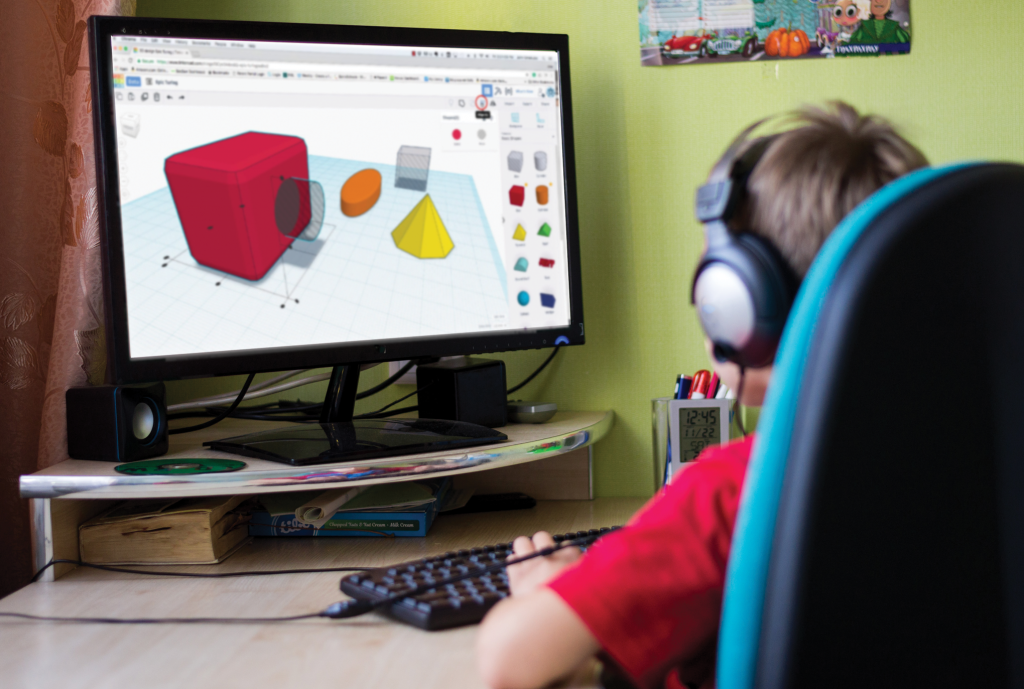
3D Digital Art: Design and Modeling with TinkerCAD: Online Class
Dream it. Design it. Create it! This program will introduce you to the basics of 3D design and architecture, with a focus on designing real world objects, 3D buildings and provide an introduction to creating basic characters. Participants will use TinkerCAD software to create 3D designs. Then, work together as a team of innovators to engineer cool three-dimensional cityscapes and other objects, devices, or gadgets. Find your inner 3D artist as we conceptualize and realize our own multidimensional art. No prior experience is necessary! All skill levels are welcome.
📋
Program Details
Key Info & Requirements
Grade Level
Grades 4-11
Class Format
Live online instruction with a teacher
Session Length
4 sessions • 6 hours total
Price
$149.99
Class Size
Small group instruction
Hardware Needed
Primary Computer Device:
• Windows 8, 10 or 11
• or Mac OS
Additional Tech Used:
• Headphones
• Microphone
• Web Camera
• Windows 8, 10 or 11
• or Mac OS
Additional Tech Used:
• Headphones
• Microphone
• Web Camera
Software Used
• TinkerCAD
🎯
Learning Outcomes
What Students Will Learn
By the end of the program, students will understand core concepts and build practical experience they can continue developing.
Learn to construct detailed 3D images
Understand sophisticated software tools like TinkerCAD
Understand the principles of creating dynamic and interesting 3D images
Understand the concepts of scope, scale and functionality in design
Learn to define opportunities for collaboration and creating a huge meta-project as a team
🌟 Included with Every Enrollment
The learning doesn’t end when class does.
Every student unlocks our Always-On Learning Hub - a premium digital learning layer that keeps momentum alive between sessions and long after class ends.
📘 Course Notes - every lesson, project, and key idea organized and always within reach
💬 Student Community - a safe, kid-powered space where creativity and curiosity keep moving
🤖 BitBuilder AI Mentor - a 24/7 guide ready with answers, ideas, and creative sparks anytime
🔒 Protected by our Two-Session Fit Guarantee
This is more than bonus content. It is a safety net, a springboard, and a doorway into deeper growth - giving students a place to keep learning, building, and exploring beyond the live session.
❓
FAQ
Common Questions
Answers to the questions families most often ask before enrolling.
What will my child do in this class?
Do students need prior experience?
No prior experience is required unless a program description specifically says otherwise. Our instructors guide students step by step and help beginners build confidence while still challenging returning learners.
What happens if my child misses a class?
If a student misses a session, they can review the lesson materials and course notes in the learning hub. Because these programs are interactive and live, attending class is the best experience, but students can still use the available materials to continue making progress.
What is the 2-Session Fit Guarantee?
If your child fully attends the first and second sessions of the program and is not engaged by the end of the second session, simply let us know within 6 hours after the second session ends, or by 10 PM Eastern time, whichever is later. We will provide a prorated account credit for the unused sessions that can be applied to a future online class or program. No hassles and no fine print, just peace of mind.
What equipment or software does my child need?
Each program includes the hardware and software requirements on this page. Most online classes require a compatible computer, a stable internet connection, and access to Zoom for live instruction.
How big are the classes?
Classes are intentionally kept small so instructors can provide personalized guidance and answer questions as students work through their projects.
Can my child continue learning after this class?
Yes. Many students continue exploring related topics through our other programs and learning areas. You can browse related categories on this page to discover the next step in your child’s learning journey.
📘
Program Overview
3D Digital Art: Design and Modeling with TinkerCAD: Online Class
Dream it. Design it. Create it! This program will introduce you to the basics of 3D design and architecture, with a focus on designing real world objects, 3D buildings and provide an introduction to creating basic characters. Participants will use TinkerCAD software to create 3D designs. Then, work together as a team of innovators to engineer cool three-dimensional cityscapes and other objects, devices, or gadgets. Find your inner 3D artist as we conceptualize and realize our own multidimensional art. No prior experience is necessary! All skill levels are welcome.
📋
Program Details
Key Info & Requirements
Grade Level
Grades 4-11
Class Format
Live online instruction with a teacher
Session Length
4 sessions • 6 hours total
Price
$149.99
Class Size
Small group instruction
Hardware Needed
Primary Computer Device:
• Windows 8, 10 or 11
• or Mac OS
Additional Tech Used:
• Headphones
• Microphone
• Web Camera
• Windows 8, 10 or 11
• or Mac OS
Additional Tech Used:
• Headphones
• Microphone
• Web Camera
Software Used
• TinkerCAD
🚀
Skills
Skills Your Child Will Gain
Students build creative, technical, and problem-solving skills they can carry into future projects, classes, and digital experiences.
2D digital art
3D design
3D digital art
Blended medium design
Brainstorming
Building design
CAD modeling software
Collaboration and communication
Constructive feedback
Creative expression
Cross medium design
Digital art design
Digital art techniques
Digital art tools
Digital painting/drawing
Exploration of digital possibilities
Image converting
Importing/Exporting files
Introduction to 3D art and modeling
Iterative design
Personal expression
Portfolio creation
Project management
Scope and scale
Style
Time management
🧭
Categories
Explore Similar Topics
This program is featured in the following learning areas. Explore related topics and discover more programs.